March 27Mar 27 comment_330490 10 minutes ago, Project LC said:I believe the latest with the platinum passes (until Merlin backtracks) is that they cant use their free shot on any ride with a queue longer than 90 minutes. So hopefully any impact from them is limited.My point about the premium pass fast track is that most of the daily allocation will likely go to Hyperia.I don’t see that being as much of an issue at other parks. For example, at Towers I imagine a high percentage would be split on Smiler, Wickerman, and Nemesis.Just my thoughts anyway from what I've observed, no facts.
March 28Mar 28 Author comment_330493 They should have kept the price high. It's weird Towers is charging £20 for one of their coasters, yet Thorpe have reduced the cost of a one shot of their newest coaster foe their newest coaster.I'd hope that yesterday's long Fastrack queues is a one off due to the mixture of the taste unlimited Fastrack, first day having extra Premium Passholders, etcThe Premium Passholder perk of one free Fastrack per visit is a real wildcard and I expect we'll see lots of quirks over the coming weeks. I agree most people will end up wanting to use their's on Hyperia at Thorpe.
April 6Apr 6 comment_330565 It appears some visible work has happened to the splashdown.Although I remember the same thing happening last year at some point and nothing seemed to happen. Strange.
April 8Apr 8 comment_330583 I don't like splashes, I don't like pipework, erm, I don't like, don't like, lake water, particuarly, I don't like sweeping brushes, I don't like much really do I? but what I do like, I love passionately
April 8Apr 8 Author comment_330584 4 hours ago, Parm Pap said:I don't like splashes, I don't like pipework, erm, I don't like, don't like, lake water, particuarly, I don't like sweeping brushes, I don't like much really do I? but what I do like, I love passionatelyAnd what does Parm Pap like, beyond long-winded ways of saying (I presume) "the water effect won't make a splash back soon"?
April 14Apr 14 comment_330646 On 3/27/2026 at 7:20 PM, Cal said: 1) Price of one shots have been reduced. £12 for off peak days and £16 for peak days. It has been a flat £20 every day for the last 2 seasons so not sure why its been reduced, certainly going to have more people buying it.I was actually wrong about this, there are 3 prices for Fastrack with super off peak being £8. So today Hyperia has a 75 minute queue and Fastrracks are only £8. Very strange decision.
April 14Apr 14 Author comment_330655 I think that (quite unusually) Hyperia was only on one train, which may explain the abnormally long queue.
April 14Apr 14 comment_330657 7 hours ago, Cal said:I was actually wrong about this, there are 3 prices for Fastrack with super off peak being £8.So today Hyperia has a 75 minute queue and Fastrracks are only £8. Very strange decision.Perhaps one train meant the fast track wasn't so fast.Why when it's on one train, must it vallet into the station so slowly from the break run? Surely the computer could speed it up.
April 24Apr 24 comment_330779 Seems they've gone back to not sending empty trains again. On the last train yesterday we spent what felt like forever on the break run whilst they filled the 3 front rows with water dummies.
April 29Apr 29 Author comment_330872 Parm Pap's weather reports are more insightful than an endoscopy.
May 1May 1 comment_330909 Bit of positive news having visited Hyperia Yesterday is just how good the operations are, the ride took 15 min to open after park open, which is ok as u can tell the ride is running slow in the cold (makes you wonder if wheel heaters are worth investing in)But such a great ride team, it was the same as when I visited last year, they will fly through the queue. It gets to the point where the ride barely stacks on the brake run (though obviously the brake run is relatively slow)Interesting observation is how many people where re joining the queue and how many asked for front row (and how a front row queue would become so overwhelming on this ride)Single rider is good though like Smiler at Towers, you wonder how many people in that queue are on there own ;p
July 4Jul 4 comment_331736 Does anyone else find that last, or second last little turn out of sync with the rest of the ride. Obviously it's lining you up to come back to the station. A bit of an anti cimlax.
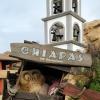
August 13Aug 13 comment_332563 Who in the name of Shane Sandwich signed this absolute monstrosity off.Cue the Merlin sycophants with "wELl ItS A GoOd OPpORtuNItY tO gEt MoNEy IN"No, No it's not. It makes your multi million pound investment look like total utter trash.Total garbage that speaks volumes.Could have even gone for "Flipz Valley", at least it starts with an F.Wonder if SLKSTN will talk this one up. I'm intrigued to see if ANY vlogger has anything good to say about this whatsover, or will they be too scared to lose their Press Night passes for Fright Nights?Well, I can think of a channel straight away that will rip it to shreds who don't have an invite to Press anyway... Alright dudes, keep those fins inside the fish....
August 13Aug 13 comment_332566 now look here, ding dong.I will not parp defend the indefensible.but golden goddesses are not invincible. sometimes, they get hungry just like us. and hey, if hyperia's favourite snack comes in the pretzel variety, who are we to deny her such sustenance?okay, ding a dong, if we are to afford more spooks and scares this halloween, we must acquire the budget from something else. pretzel rides do not get built on their own, nor do mazes. these things cost money you know!!andthere is none!
August 13Aug 13 comment_332567 Hearing that the SRQ is also closed today?Which would be the first time since opening they haven't operated the SRQ. I wonder why?EDIT: RAP queue is closed, so they’re using the SRQ for RAP. Unsure why RAP is closed though. Edited August 13Aug 13 by Cal
August 13Aug 13 comment_332570 1 hour ago, Parm Pap said:now look here, ding dong.I will not parp defend the indefensible.but golden goddesses are not invincible. sometimes, they get hungry just like us. and hey, if hyperia's favourite snack comes in the pretzel variety, who are we to deny her such sustenance?okay, ding a dong, if we are to afford more spooks and scares this halloween, we must acquire the budget from something else. pretzel rides do not get built on their own, nor do mazes. these things cost money you know!!andthere is none!shush
August 13Aug 13 Author comment_332577 3 hours ago, Cal said:EDIT: RAP queue is closed, so they’re using the SRQ for RAP. Unsure why RAP is closed though.It appears the Flipz sign is directly above the entrance for RAP. So either they've shut it off for today to ensure the sign is up securely / wait until they can fix it up more securely / awaiting H&S sign off, or it will have to be shut during the whole time the sign is up...
August 13Aug 13 comment_332580 Thing is, it might be slightly better if they kept up with maintenance of the queue line and it wasn’t dirty. The general upkeep of that queue line, fencing, lighting, bins, graffiti, dirt on the floor, the fact the whole thing is in the blazing heat due to the reflective floor.And it might been slightly better, if it was actually themed. It’s a disaster, there’s more theming for the chocolate than then Hyperia.
August 13Aug 13 comment_332587 5 hours ago, JoshC. said:It appears the Flipz sign is directly above the entrance for RAP. So either they've shut it off for today to ensure the sign is up securely / wait until they can fix it up more securely / awaiting H&S sign off, or it will have to be shut during the whole time the sign is up...Hopefully was just for today. The look of it all is bad enough, but even worse that its effecting operations and guest experience.
August 14Aug 14 comment_332605 Shades of Oblivion and Fanta.I don't get it. Nor have ever noticed a brand that has apparently been around since the late 90s.RCDB even updated the entry.
August 14Aug 14 Author comment_332618 SRQ is back today. I think it was a H&S sign off thing for guests to walk under the Flipz sign which was the issue. So the blocked off the RAP queue, meaning that took over the SRQ space.


Join the conversation
You can post now and register later. If you have an account, sign in now to post with your account.